- Install
- Basic operation
- Basics of programming for electronic work
- Basics of programming for Excel
- Machine learning with scikit-learn
- Visualizing data with matplotlib
- Web programming
- RPA programming
- Miscellaneous programming
- Reference
Control MAX30100
You can control the MAX30100, a pulse and SpO2 (blood oxygen saturation) sensor.
MAX30100-related blocks are located in the "Sensors" - "Body" - "MAX30100" group.
However, the MAX30100 is only compatible with Arduino firmware.
Wiring
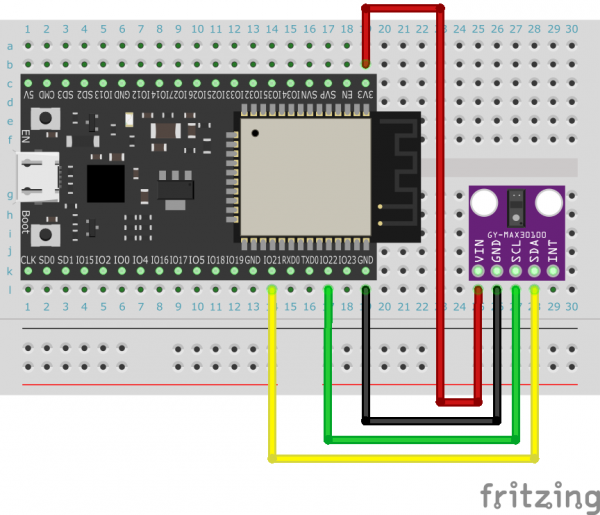
The MAX30100 module and microcontroller are connected via I2C.
The pin numbers used for I2C connections vary depending on the microcontroller.
For details, see the "I2C Connection" page.
For example, with a standard ESP32, connect SDA to pin 21 and SCL to pin 22.
Initialization
For microcontrollers with fixed I2C pin numbers, such as the original ESP32, use the "Initializing the MAX30100" block.

Also, for microcontrollers with variable I2C pin numbers, such as the ESP32-S3, use a block to specify the pin number during initialization.

Acquire Pulse Rate and SpO2
After initialization, you can use the blocks to acquire pulse rate and SpO2.
You can assign the values obtained by these blocks to variables or output them to the screen.


Detecting the pulse rate
Using the "When a pulse rate is detected by the MAX30100" block, you can perform some processing when a pulse rate is detected.
Include the processing you want to perform when a pulse rate is detected in this block.

However, if you include within this block blocks that control the microcontroller to which the MAX30100 is connected or other modules connected to that microcontroller, the processing of those blocks may not be immediate.
Example
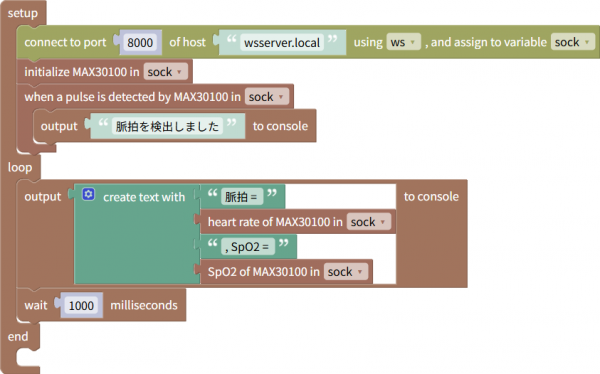
The following example reads the pulse rate and SpO2 from the MAX30100 every second and outputs them to the web browser console.
It also outputs a message to the web browser console when a pulse is detected.
This program can be downloaded from here.