- Install
- Basic operation
- Basics of programming for electronic work
- Basics of programming for Excel
- Machine learning with scikit-learn
- Data
- Prepare data
- Regression
- Classification
- Clustering
- Dimensionality reduction
- Metrics
- Data
- Visualizing data with matplotlib
- Web programming
- RPA programming
- Miscellaneous programming
- Reference
Prepare data
This page explains the steps to prepare data for training.
1. Using scikit-learn's built-in datasets
If you're new to machine learning with scikit-learn, it's a good idea to start by practicing with the built-in datasets.
The following datasets are available:
- iris
- wine
- diabetes
- breast_cancer
- california_housing
The datasets are loaded into Excel and used.
Drag the Import Dataset block into a cell range and specify the destination cell.

2. Prepare your own dataset
For actual data analysis, you will use a dataset you have prepared yourself.
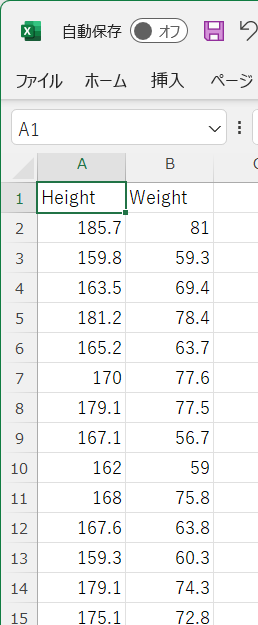
Enter your data into an Excel worksheet.
Enter the name of the series in the first row, and enter the actual data from the second row onwards.
For example, if you want to analyze the relationship between height and weight using regression, enter the data as shown in the screenshot below.