- Install
- Basic operation
- Basics of programming for electronic work
- Basics of programming for Excel
- Machine learning with scikit-learn
- Visualizing data with matplotlib
- Web programming
- RPA programming
- Miscellaneous programming
- Reference
Control MPU6050
You can control the MPU6050 accelerometer/gyro sensor.
The MPU6050-related blocks are in the "Sensor" - "Motion" - "MPU6050" group.
Connection
The microcontroller and MPU6050 are connected via I2C.
If the microcontroller has fixed I2C SDA/SCL pins, use those fixed pins.
For example, when connecting to an ESP32, connect as shown in the diagram below.
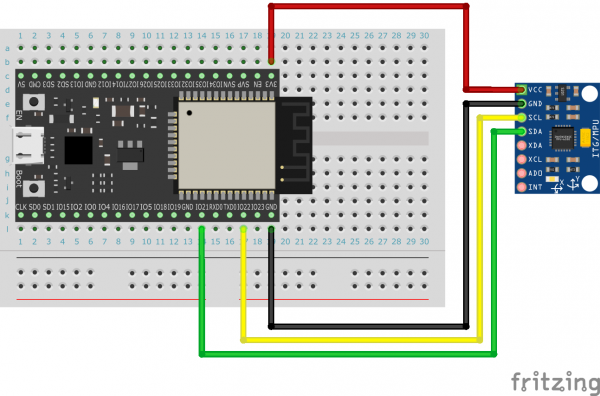
Also, for microcontrollers where the I2C SDA/SCL pins are not fixed, specify the pin numbers to which the SDA/SCL are connected during initialization.
Initialization
For microcontrollers where the SDA/SCL pins are fixed, use the following initialization block.

Also, for microcontrollers where the SDA/SCL pins are not fixed, use the following initialization block to specify the pin numbers to which SDA/SCL are connected.

Getting information
To get information from MPU6050, first execute the block that updates the information.

Then, use the block that gets information to get acceleration and angular velocity information.
The unit of acceleration is G (gravitational acceleration).
The unit of angular velocity is degrees/second.

Example
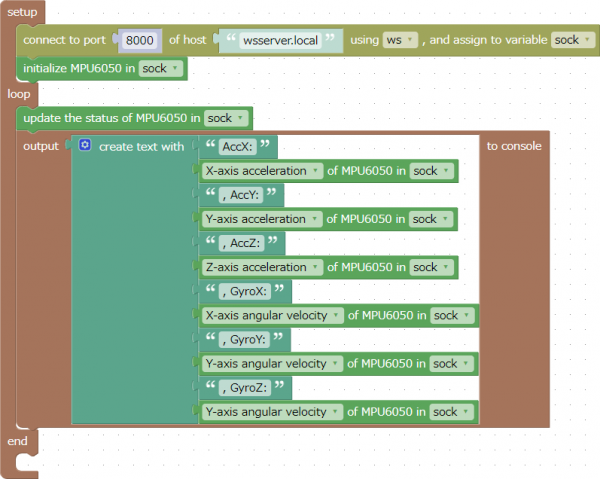
This is an example of getting acceleration and angular velocity from the MPU6050 and outputting that information to the console.
This program can be downloaded from here.