- Install
- Basic operation
- Basics of programming for electronic work
- Basics of programming for Excel
- Machine learning with scikit-learn
- Visualizing data with matplotlib
- Web programming
- RPA programming
- Miscellaneous programming
- Reference
- "Basic" group
- ”Basic I/O" group
- ”PWM Output" group
- "Servo Motor" group
- ”Motor" group
- ”Display" group
- ”Sensor" group
- "Micro controller" group
- "Excel" group
- "Basic" group
- "Workbook" group
- "Sheet" group
- "Range" group
- Overview
- Usage of each block
- "Macro" group
- "scikit-learn" group
- "matplotlib" group
- "Web" group
- "File" group
- "Image" group
- "Turtle" group
- "Speech" group
Usage of each block
Specify a cell by row/column number

Specify the cell to be operated by row and column number.
If you want to operate a cell other than the active sheet, put a block representing the sheet (and book) to be operated on in the "Active sheet" block.
Specify cell range

Specify the cell to be operated in A1 format.
If you want to operate a cell other than the active sheet, enter a block representing the sheet (and book) to be operated on in the "Active sheet" block.
A series of operations on a cell range

Performs a series of operations on a specified cell range.
The cell range is specified in the "Specify cell by row/column number" or "Specify cell range" block.
The operation you want to perform is also placed in the block.
In the block, you can use the "Cell to be operated on" block to indicate the cell currently being operated on.
Target cell

In the "Series of operations on cell range" block, this indicates the cell that is the target of the operation.
It can be used to indicate a cell in various blocks that operate on cells.
Set value
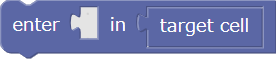
Set a value for the cell.
In the "Target cell" field, enter a block that represents the target cell.
Get value
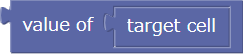
Get the cell value.
In the "Target cell" field, enter a block that represents the target cell.
Set formula

Set a formula for the cell.
In the "Target cell" field, enter a block that represents the target cell.
Set number format

Set the cell display number format.
In the "Target cell" field, enter a block that represents the target cell.
Set text color

Set the cell text color.
In the "Cell to be operated on" field, enter a block that represents the cell to be operated on.
Set background color

Set the background color of the cell.
In the "Cell to be operated on" field, enter a block that represents the cell to be operated on.
Set font

Set the font for the cell text.
In the "Target cell" field, enter a block that represents the target cell.
Set font size

Set the font size for the cell text.
In the "Target Cell" field, enter a block that represents the target cell.
Set font bold

Set whether to make the cell text bold.
In the "Target Cell" field, enter a block that represents the target cell.
Set font italics

Set whether to make the cell text italic.
In the "Target cell" field, enter a block that represents the target cell.
Set border type

Set the cell border type.
In the first dropdown, specify which position of the cell you want to change the border type for.
In the "Target cell" field, enter a block that represents the target cell.
Set border color

Set the cell border color.
In the first dropdown, specify which position of the cell you want to change the border color for.
In the "Target cell" field, enter a block that represents the target cell.