- Install
- Basic operation
- Basics of programming for electronic work
- Basics of programming for Excel
- Machine learning with scikit-learn
- Visualizing data with matplotlib
- Web programming
- RPA programming
- File
- File system
- File read and write
- Image
- File
- Miscellaneous programming
- Reference
File read and write
The "File" - "File Read/Write" group blocks allow you to read and write files.
Connecting to the RPA Server
File reading and writing are performed via the RPA server.
Before executing the file reading/writing blocks, execute the block that connects to the RPA server.

Opening a File
When reading or writing a file, first open the target file using the "open file" block.
When you open a file, the ID corresponding to the file is returned; assign this ID to a variable.
This variable is then used to read and write files.

The "mode" parameter specifies the read/write mode.
The operation for each mode is as follows:
| Mode | Operation |
|---|---|
| read(r) | Opens the file to read from it. Accesses from the beginning of the file. |
| write(w) | Opens the file to create a new file and write to it. If the file already exists, its contents will be erased. Accesses from the beginning of the file. |
| append(a) | Opens the file to append to an existing file. Accesses from the end of the file. |
| exclusive write(x) | Opens the file to create a new file and write to it. If the file already exists, an error will occur. Accesses from the beginning of the file. |
Checking the "update" box opens the file in read/write mode.
Checking the "binary" box opens the file in binary mode (if unchecked, it opens in text mode).
Reading a Text File
To read strings from a text file, use the "read all text," "read a line of text," or "read XX characters of text" blocks.



When using the "read a line" and "aead XX characters" blocks, it's necessary to stop reading once the end of the file has been read.
If you execute another read block after the end of the file has been read, the return value will be an empty string.
After reading within the loop, if the return value is an empty string, exit the loop.
For example, to use the "read a line" block to read a file, assign the string to the variable txt, and output it to the console, you would construct the block as follows:
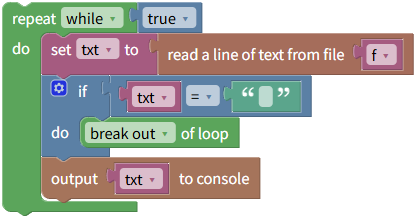
The "read ane line" block reads lines that have a newline character at the end, and the newline character is also added to the read value.
The "Text" group's "string removed the newline character at the end of line" block allows you to remove trailing line breaks.
Writing to a Text File
The "write text" block allows you to write strings to a text file.

Checking "newline" will write newline characters after the string is written.
Reading a Binary File
If you checked "binary" when opening the file, the "read binary data XX bytes" block reads the data.
The read result is returned as a list of binary (numerical) values.

Once the end of the file has been read, it's necessary to stop reading further.
If you execute another read block after the end of the file has been read, the return value will be an empty list.
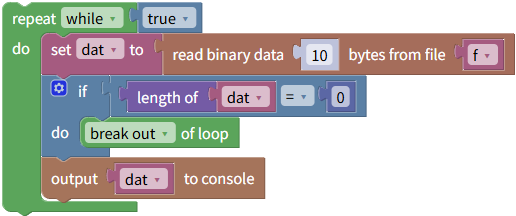
You can determine if the end of the file has been read by checking if the list length is 0.
For example, to use the "read binary data XX bytes" block to read 10 bytes at a time from a file, assign them to the variable `dat`, and output them to the console, you would construct the block as follows:
Writing to a Binary File
The "write binary data" block allows you to write data to a binary file.
The data to be written is passed as a list of binary (numerical) values.

Getting and setting the read/write position
The "current position" block can be used to obtain the current read/write position.

Furthermore, the "set position" block can be used to set the position for the next read/write operation.

However, for text files, you can only set the position from the beginning of the file.
When targeting a text file, specifying "end" or "current position" in the position parameter will result in an error.
Close File
After the file read/write operation is complete, execute the "Close File" block at the end.