- Install
- Basic operation
- Basics of programming for electronic work
- Basics of programming for Excel
- Machine learning with scikit-learn
- Visualizing data with matplotlib
- Web programming
- RPA programming
- Miscellaneous programming
- Reference
Usage of each block
Connect to microcontroller

Connect to the microcontroller and assign it to a variable.
For detailed settings, please refer to this page.
Get model name

Get the model name of the connected microcontroller.
You will get the following string:
| Microcontroller type | Model name |
|---|---|
| ESP32 series | esp32 |
| Raspberry Pi | rpi |
| Raspberry Pi Pico | pico |
| Raspberry Pi Pico W | picow |
Pin assignment

Assign the microcontroller pins to variables.
Specify the variable pointing to the microcontroller to connect to, the pin number, and the variable to be assigned.
In the input/output block, specify the pin using the destination variable.
Setting pin mode

Specifies the mode of the specified pin.
Specify the variable to which the pin is assigned and the value representing the mode.
Specify the value from one of the following.
| Value to specify | Mode |
|---|---|
| OUTPUT | Output |
| INPUT | Input |
| INPUT_PULLUP | Input (pull-up resistor enabled) |
Digital output

Outputs a HIGH or LOW digital value to the specified pin.
Specify the variable to which the pin is assigned and the output value (HIGH/LOW).
Digital input

Gets the digital input of the specified pin.
Specifies the variable to which the pin is assigned.
Analog input

Gets the analog input of the specified pin.
Specifies the variable to which the pin is assigned.
Values range from 0 to 4095.
Please note that this block cannot be used with Raspberry Pi (it can be used with Pico/PicoW).
Converting a range of values

Converts values from one range to another range.
It is mainly used to convert analog input values (0 to 4095) to voltage.
Specify the conversion source value and the conversion source/conversion destination range.
HIGH/LOW
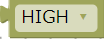
Represents either HIGH/LOW value.
It is mainly used when you want to judge HIGH/LOW in a conditional judgment block.