- Install
- Basic operation
- Basics of programming for electronic work
- Basics of programming for Excel
- Machine learning with scikit-learn
- Visualizing data with matplotlib
- Web programming
- RPA programming
- Miscellaneous programming
- Turtle graphics
- Speech
- Speech synthesis
- Speech recognition
- Reference
Speech recognition
You can perform simple speech recognition using your web browser's Web Speech API.
However, only some web browsers support this feature (check this page for compatibility).
Starting Speech Recognition
To perform speech recognition, select the language in the "set recognition language to XX" block, then execute the "start recognition" block.


After starting recognition, it will continue until the "stop recognition" block is executed or the program terminates.
During this time, you can speak into the microphone connected to your PC to recognize your voice.
After starting recognition, recognition will end when the program terminates.
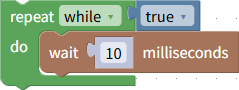
If you want the program to continue running and speech recognition to continue, insert a loop block like the one below at the end of the program.
Processing when recognition occurs
To perform some processing when speech is recognized, use the "on result" block.
Place the desired processing block inside this block.

You can also obtain the recognized text by using the "transcript" block within this block.
You can assign text to variables or combine it with string-related blocks.

Get Intermediate Recognition Results
If you check "interim results" in the "start recognition" block, the processing in the "on result" block will be executed even if recognition is in progress.
In this case, you can determine whether recognition is in progress or has completed by checking the value of the "is interim" block.
If recognition is in progress, the value of the "is interim" block will be true.

Example
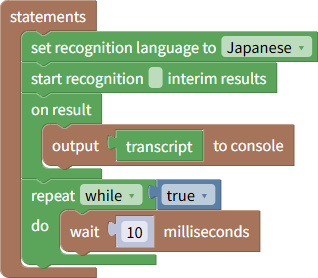
The following program is an example that outputs recognized text to the console.
After running the program, speak into the microphone to see the recognition results.
You can download this program from here.