- Install
- Basic operation
- Basics of programming for electronic work
- Basics of programming for Excel
- Machine learning with scikit-learn
- Visualizing data with matplotlib
- Web programming
- RPA programming
- Miscellaneous programming
- Turtle graphics
- Speech
- Speech synthesis
- Speech recognition
- Reference
Speech synthesis
You can perform simple speech synthesis using the Web Speech API in your web browser.
Basic Usage
Drag the "speak text" block in the "Speech" group and enter the text you want to read.
If you check "async," the next block will execute as soon as speech begins (asynchronous speech).
For more information about asynchronous speech, see the following section.
On the other hand, if you uncheck this box, the next block will not execute until speech finishes.

To change the voice, use the "set voice to XX" block or "set language of voice to XX" block.


However, because voice names vary depending on the web browser, using a block that selects the voice name in detail can result in incorrect voices when the program is run in other web browsers.
For programs that may be run in other web browsers, use a language name block, such as "set language viuce to English."
Speed Settings
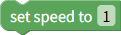
To change the reading speed, use the "set speed to XX" block.
The value can be set between 0.1 and 10, with 1 being the base speed.
For example, setting 0.5 will result in half speed.
To change the pitch of the voice, use the "set pitch to XX" block.
The value can be set between 0 and 2, with 1 being the base pitch.
Settings below 1 will result in a lower voice, while values above 1 will result in a higher voice.

To change the volume, use the "set volume to XX" block.
You can specify a value between 0 and 1, with 1 being maximum volume.

Asynchronous speaking
Checking "async" in the speak block allows you to execute subsequent programs while spaeking.
While reading asynchronously, you can control the reading using blocks such as "pause speech."



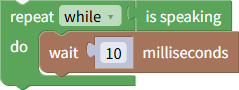
You can also use the "is speaking" block to check whether speech is currently being spoken.

If the program terminates during asynchronous speech, speech will also terminate.
If you don't want the program to terminate until speech is finished, add a loop at the end of the program to determine whether speech is currently being spoken, and wait 10 milliseconds each time during the loop.