- Install
- Basic operation
- Basics of programming for electronic work
- Basics of programming for Excel
- Machine learning with scikit-learn
- Visualizing data with matplotlib
- Web programming
- RPA programming
- Miscellaneous programming
- Turtle graphics
- Turtle graphics
- Speech
- Turtle graphics
- Reference
Turtle graphics
You can draw turtle graphics using Python's turtle module.
Starting and Connecting to the misc Server
To draw turtle graphics with Tsumicky, you need to start the server.
The startup procedure is described on this page.
Then, connect to the server using the misc server connection block.

Initializing the Turtle Graphics Window
Use the "Initialize Turtle" block to specify the size and position of the Turtle Graphics window.

Various Drawings
Use the various blocks in the "Turtle" group to draw lines and other objects in the Turtle Graphics window.
For information on how to use each block, see this page.
Ending Drawing
If you don't want to perform any processing after drawing with Turtle Graphics, connect the "End Drawing" block at the end.

Without this block, the Turtle Graphics window will freeze after drawing is complete, and you will not be able to move or resize it.
Drawing Update
If you are creating a program that performs processes other than drawing, and those processes take a long time, insert "Drawing Update" blocks throughout the process.

Without this block, the Turtle Graphics window will freeze while performing any process other than drawing, and you will not be able to move or resize it.
Example
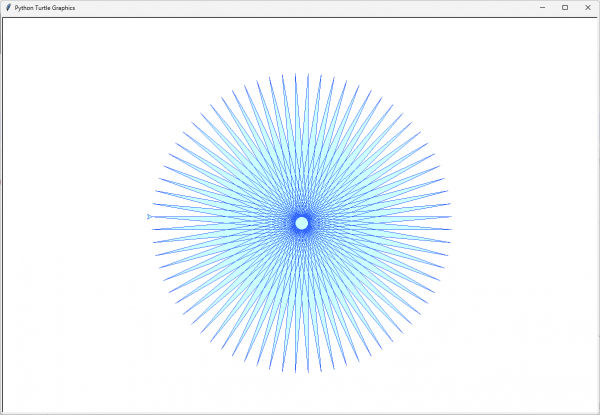
This is an example of drawing shapes using Turtle Graphics.
You can download this program from here.
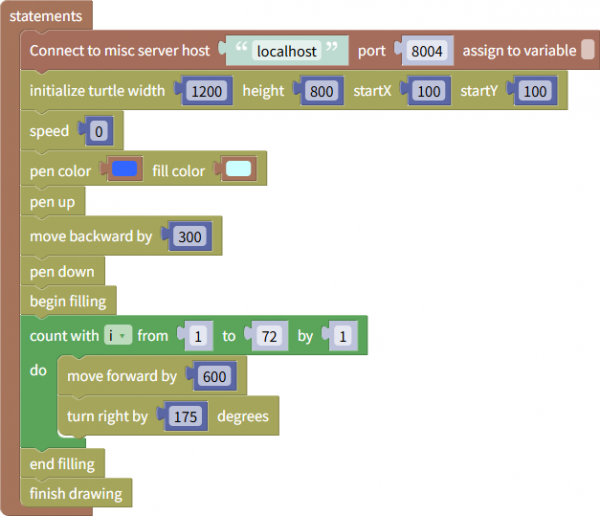
When you run this program, you'll see the following output: