- Install
- Basic operation
- Basics of programming for electronic work
- Basics of programming for Excel
- Machine learning with scikit-learn
- Visualizing data with matplotlib
- Web programming
- RPA programming
- Miscellaneous programming
- Reference
- "Basic" group
- ”Basic I/O" group
- ”PWM Output" group
- "Servo Motor" group
- ”Motor" group
- ”Display" group
- ”Sensor" group
- "Micro controller" group
- "Arduino UNO Q" group
- "Camera" group
- "Code detection" group
- Overview
- Usage of each block
- "Video object detection" group
- "Arduino UNO Q" group
- "Excel" group
- "scikit-learn" group
- "matplotlib" group
- "Web" group
- "File" group
- "Image" group
- "Turtle" group
- "Speech" group
Usage of each block
Detector Initialization

This initializes the detector for detecting barcodes and QR codes.
Checking the "Display Image" checkbox will open a pop-up window showing the camera's image.
In the camera initialization block, assign the camera to a variable and specify it as a camera parameter.

Also, the detector is assigned to a variable.
This variable is used when obtaining the detection result.

Getting the detection result

Retrieves the detection results for barcodes and QR codes.
The detection results are assigned to a variable.

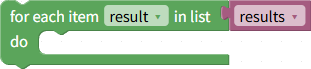
Since multiple barcodes/QR codes may be detected simultaneously, the detection results will be in the form of a list.
The program iterates through this list, processing the detection results for each code/QR code sequentially.
Detection result type

Retrieves the detection result type for each individual barcode/QR code.
Detection Result Value
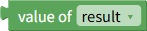
Retrieves the detected code for each individual barcode/QR code.
Reset All Detected Statuses

While the program is running, codes that have already been detected will not be detected again.
Executing this block will reset the detected status of all detected codes, making them detectable again.
Reset Detected Status

This resets the detected status of the specified detected code, making it detectable again.