- Install
- Basic operation
- Basics of programming for electronic work
- Basics of programming for Excel
- Machine learning with scikit-learn
- Visualizing data with matplotlib
- Web programming
- RPA programming
- Miscellaneous programming
- Reference
- "Basic" group
- ”Basic I/O" group
- ”PWM Output" group
- "Servo Motor" group
- ”Motor" group
- ”Display" group
- ”Sensor" group
- "Micro controller" group
- "Arduino UNO Q" group
- "Camera" group
- "Code detection" group
- "Video object detection" group
- Overview
- Usage of each block
- "Arduino UNO Q" group
- "Excel" group
- "scikit-learn" group
- "matplotlib" group
- "Web" group
- "File" group
- "Image" group
- "Turtle" group
- "Speech" group
Usage of each block
Initializing the Object Detector

This initializes the object detector.
The confidence parameter should be set to a value between 0 and 1. Only detected objects with a confidence level exceeding this value will be included in the detection results.
For the camera parameter, the camera must be initialized beforehand and assigned to a variable; this variable should then be specified.

Checking the "diaplay image" checkbox will show the camera's video feed in a pop-up window.
The initialized object detector is assigned to a variable.
This variable is then used as a parameter for the detector in a block, such as "when an object is detected".

When objects are detected

This defines the callback to be executed when an object is detected by the object detector.
The detector parameter specifies the detector that has been initialized and assigned to a variable.
The argument parameter specifies the variable that will receive the detection result.
When a specific object is detected

This defines the callback to be executed when a specific object is detected by the object detector.
The detector parameter specifies the detector that has been initialized and assigned to a variable.
The argument parameter specifies the variable that will receive the detection result.
Repeat for each type of object detected

Used within the "When objects are detected" block, this loops through each detected object type.
The object's name and detection result are assigned to the variables specified in the name and data parameters, respectively.
Repeat for each detected object
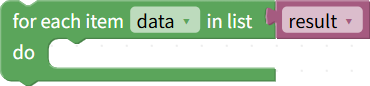
Use this within a block that says "When a specific object is detected" or a block that says "Repeat for each type of detected object".
Processes the detection results of each object in order for a specific type of object.
The parameter "For each item XX" specifies the variable to which the detection results will be assigned.
Is a specific object present in the detected objects?

Used within the "When objects are detected" block, this retrieves whether the specified object is included in the object detection results.
By combining it with conditional judgment blocks, you can describe the processing to be performed when a specific object is detected.
Retrieving Detection Results for a Specific Object

Used within the "When objects are detected" block, this retrieves only the information about a specific object from the object detection results.
By assigning the retrieved results to a variable and specifying it as a parameter for "List XX" in "Repeat for each detected object," you can process each object sequentially.
Number of Object Types

Used within the "When an object is detected" block to retrieve the number of object types included in the detection results.
Number of Objects

Used within the "When an Object is Detected" block to retrieve the number of objects included in the detection result.
Confidence Level of Detected Objects

Retrieves the confidence level of the detected objects.
Coordinates of the detected object

Retrieves the coordinates of the box surrounding the detected object.