- Install
- Basic operation
- Basics of programming for electronic work
- Basics of programming for Excel
- Machine learning with scikit-learn
- Visualizing data with matplotlib
- Web programming
- RPA programming
- Miscellaneous programming
- Reference
PWM Output on ESP32 series (deprecated)
By using PWM output, you can gradually change the brightness of the LED.
This page explains how to output PWM with ESP32/ESP32-C3/ESP32-S3.
Blocks related to ESP32-based PWM output are located in the "PWM output" → "ESP32" group.
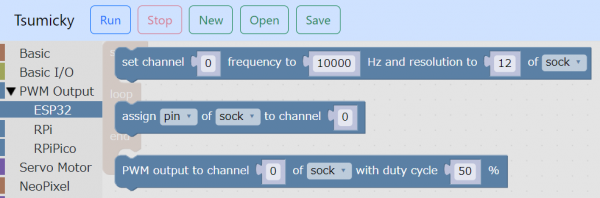
PWM channel settings
First, specify the channel to be used for PWM output and the PWM frequency/resolution in the "set channel ... frequency... Hz and resolution to ... of ..." block.

Specify the channel number in the range 0 to 15 for ESP32 and 0 to 7 for ESP32-C3 and ESP32-S3.
There is no problem in leaving the frequency and resolution as default if you are controlling the brightness of the LED.
For more information on frequency and resolution, please visit Net Search for the article and read it.
Assign channel to pin
Next, in the "assign ○○ of ○○ to channel ○○" block, assign the pin you want to use for PWM output to the channel.

Before using this block, it is necessary to assign a pin to a variable in advance using the "Assign pin XX of XX to variable XX" block in the "Basic Input/Output" group.
Perform PWM output
After making the preparations up to this point, use the block "Output PWM to channel ○○ of ○○ with a duty ratio of ○○%" to perform PWM output.
Specify the duty ratio in the range of 0 to 100.

Example
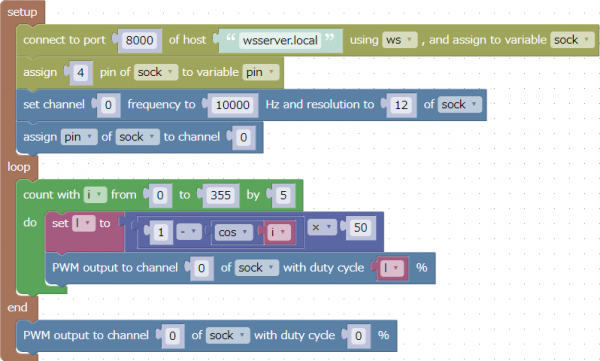
This is an example of PWM output to pin 4.
Increase or decrease the duty ratio between 0% and 100%.
If you connect an LED to pin 4, the LED will gradually become brighter and darker.
This program can be downloaded from here.