- Install
- Basic operation
- Basics of programming for electronic work
- Basics of programming for Excel
- Machine learning with scikit-learn
- Visualizing data with matplotlib
- Web programming
- Browser
- Basic program creation steps
- Web browser window operations
- Get an element and manipulating its contents
- Adding and Removing Elements
- Working with Forms
- Browser
- RPA programming
- Miscellaneous programming
- Reference
Get an element and manipulating its contents
You can get elements within a web page displayed in a pop-up window and change its content.
Getting Elements
To get HTML elements within a window, use the "element with selector XX in window XX " block.
In the "window XX" dropdown, select the variable to which you assigned the window.
In "selector XX," specify the selector for the element you want to get.

You can also get elements within a specific element.
In this case, use the "elements inner XX with selector XX" block.
Specify the element you want to get using the "elements inner XX" parameter.

The return value of these blocks points to the gotten element.
You can use this return value directly in blocks that manipulate elements.
Also, if you want to manipulate the same element multiple times, you can assign the return value to a variable and manipulate the element via that variable.
Modifying Element Content
You can modify the HTML and text within a retrieved element.
To do this, use the "set inner HTML of XX to XX" block.

Use the "Inner HTML of XX" parameter to specify the element you want to manipulate.
Use the "HTML" dropdown to specify whether you want to modify HTML or text.
Then, use the "to XX" parameter to specify the modified HTML or text.
Getting Element Content
You can also get the HTML or text within a gotten element.
To do this, use the "get inner HTML of XX" block.
The return value will be the retrieved HTML or text.

Example
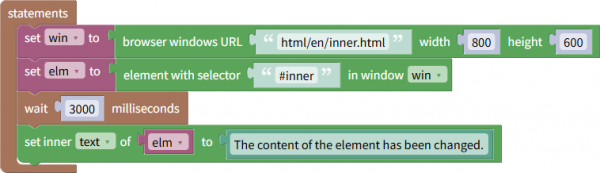
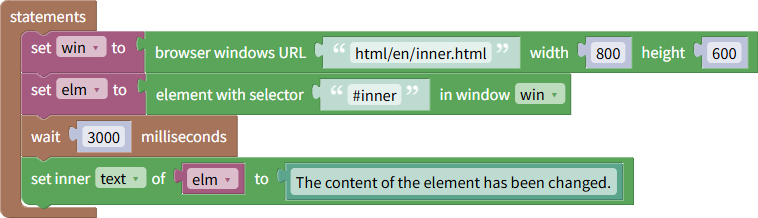
The following example modifies the content of an element with the ID "inner" on a web page three seconds after it is opened.
You can download this file from here.
Additionally, the HTML file to open with this program can be downloaded from here.
Create a folder called "html" in the Tsumicky installation folder and place the HTML file in that folder.
The element with the ID "inner" is first assigned to the variable elm.
Then, the content text is rewritten via the elm variable.
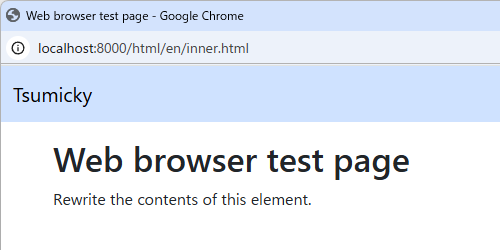
Immediately after running the program, the web page will look like this:
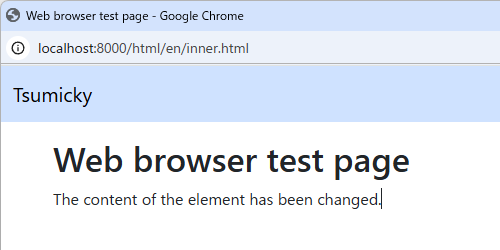
After three seconds have passed, the display will change as shown below.