- Install
- Basic operation
- Basics of programming for electronic work
- Basics of programming for Excel
- Machine learning with scikit-learn
- Visualizing data with matplotlib
- Web programming
- Browser
- Basic program creation steps
- Web browser window operations
- Get an element and manipulating its contents
- Adding and Removing Elements
- Working with Forms
- Browser
- RPA programming
- Miscellaneous programming
- Reference
Web browser window operations
This page explains how to operate the web browser pop-up window itself.
Preparing a Web Page
Pages displayed in a web browser are created using HTML and style sheets.
These files are placed in the Tsumicky installation folder.
Sample HTML files are included in the "html" folder in the Tsumicky installation folder.
Opening a Window
To open a web browser window, use the "Browser Window" block.
As parameters, specify the URL of the page to be displayed in the window and the window width and height.
The URL is specified relative to the Tsumicky page address.

To control the opened window, assign the return value of the "Browser Window" block to a variable.
For example, to assign it to the variable "win," follow the steps below.
- Create a variable "win" in the "Variables" group.
- Drag the "Set Variable to XX" block in the "Variables" group and select "win" from the variable name dropdown.
- Drag the "Open Browser Window" block to "Set to XX."

An example of opening a web browser window can be downloaded from here.
Navigate to a Page
To navigate to a different page in an already open web browser window, use the "navigate to URL XX in window XX" block.

For example, let's say you've assigned the web browser window to the variable win and want to display the page html/hello.html in that window.
In this case, follow the steps below.
- Drag the "navigate to URL in window XX" block.
- Select the variable win in the "in window XX" dropdown.
- Enter the URL "html/hello.html" in the "navigate to URL in XX" parameter.

Close Window
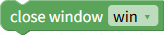
To close a web browser window, use the "close window XX" block.
In the "XX" dropdown, select the variable to which you assigned the web browser window.